
Bill of lading
SnappiiBusiness
2.67.00 Reviews
- Version
- 1.0.39
- Installs
- 10.00K
- Age Rating
- Everyone
Screenshots

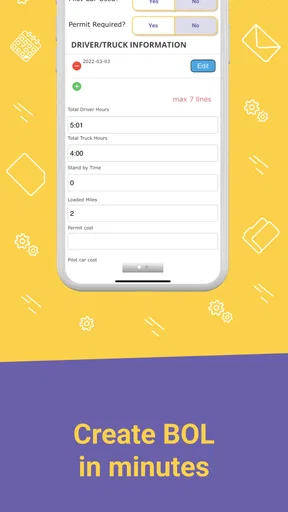
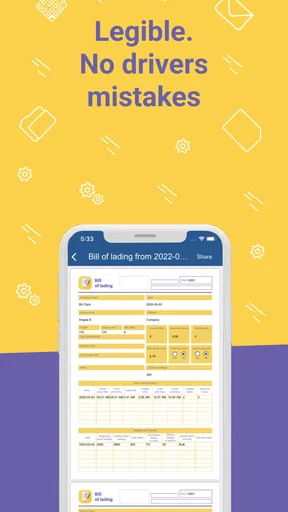
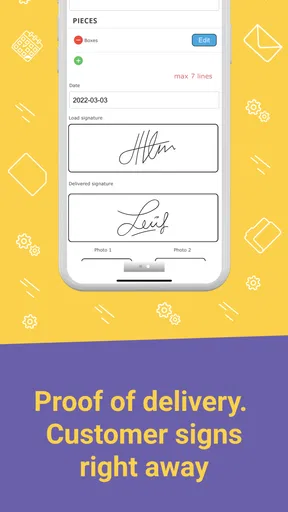
Our Review of Bill of lading
 Analysis by Appyee
When a bill of lading has to be prepared quickly, a phone can be more practical than carrying a laptop between a loading area, a small office, and a vehicle. I tested Bill of Lading Manager with that kind of everyday movement in mind, and I found an app aimed at a very specific business task rather than a general document suite. It is designed for creating bills of lading, so its value depends less on entertainment or broad productivity features and more on whether that document fits your working routine.
That narrow purpose is both its strongest point and its main limitation. If you regularly handle shipments and need a mobile way to prepare paperwork, the app can make the process feel more immediate. If you only need a bill of lading once in a while, a familiar office document or a form supplied by your carrier may be easier to manage. My overall impression is that this is a focused tool for practical situations, especially when several people share responsibility for shipping work.
How it fits a shared work device
A realistic scenario is a small household business where one person prepares orders, another loads the vehicle, and a third person handles customer or carrier communication. In that setting, the phone or tablet may not belong to one dedicated employee. It may sit on a desk, travel in a van, or be used by whoever is handling the shipment that day. A bill of lading app can be useful because the document task stays close to the physical movement of the goods.
I would not treat that shared-device arrangement as a substitute for clear responsibility. The app helps with creating the document, but the people using it still need to agree on who enters shipment details, who checks them, and who keeps the finished paperwork. That distinction matters. A fast form is only helpful if everyone follows the same handoff process.
For example, one person could gather the shipment information before loading begins, while another reviews the entries against the actual goods. The person driving or meeting the carrier can then use the completed document during the handoff. This workflow reduces the temptation to create paperwork in a rush, but it depends on people communicating outside the app. I found that the application makes the document step more accessible; it does not replace a shared filing habit or a verbal check.
Because the app is in the business category, I see it as more suitable for owner-operated companies, independent drivers, small warehouses, and occasional shipping teams than for households using it for ordinary personal errands. A shared family tablet could technically be part of the workflow, but the content is still commercial paperwork. That makes it important to keep business documents separate from unrelated personal use.
What the app does well in that setting
The main advantage is focus. Instead of opening a broad notes app and trying to build a shipping document from scratch, I can go directly to a tool centered on bills of lading. That directness is useful when the shipment is already waiting and the paperwork is the only thing holding up the handoff.
Another practical benefit is mobility. A desktop document usually works best at a desk, while this app is intended for a mobile device. That can matter when the person preparing the document is near the loading area rather than near a computer. I would still review every entry carefully, but the location-based convenience is meaningful for small operations.
The app is free to install, which makes it relatively easy to try before changing an established workflow. It has an Everyone content rating, so the age classification does not create an obvious barrier for a general shared device. Still, an age label is not the same as business training. A younger household member might be able to open the app, but that does not mean they should be trusted to finalize shipping paperwork without supervision.
Where shared use becomes uncomfortable
The biggest concern with a shared device is not the form itself; it is the boundary between one person’s work and another person’s access. Shipping documents can contain operational details, customer information, addresses, quantities, or instructions. I would avoid leaving an active document open on a tablet that is also used casually around the home.
There is also a risk of uncertainty when more than one person assumes the other has completed the document. A shared app can make access easy, but it does not automatically show who was responsible for the final review. My advice is to create a simple household or team rule: one person prepares the document, one named person verifies it, and the handoff is acknowledged before the vehicle leaves.
That rule is especially useful when the app is installed on a device used by people of different ages. The Everyone rating makes the software broadly accessible, but the business consequences of an incorrect entry are still real. In my view, trust should be based on training and accountability, not on who happens to have the phone in hand.
Setup, boundaries, and first-use decisions
My first recommendation is to decide where this app belongs before putting it into daily use. If it is installed on a personal phone, keep a clear separation between private use and shipment work. If it is on a shared tablet, choose a location where the device can be returned after the paperwork is finished. The objective is simple: people should know which device contains the active shipping workflow and who may edit it.
The developer is Snappii, and the current version is 1.0.39. The app was released on September 10, 2015, so I would approach it as a focused utility rather than assuming it behaves like a newly designed logistics platform. I would test it with a low-risk shipment first, learn the complete creation process, and only then rely on it during a time-sensitive dispatch.
That trial is important because a bill of lading is not just a blank page. The details need to match the goods, the parties involved, and the transport arrangement. Before adopting the app, I would prepare a short internal checklist covering the shipment description, quantities, addresses, dates, and any information your business normally verifies. The exact checklist will vary by operation, but the principle is universal: use the app to enter information, not to decide what information your business is legally or operationally required to record.
The minimum operating-system requirement is 8.1. That is helpful for older compatible devices, although I would still check the actual phone or tablet before assigning it to shipping work. A device that is technically compatible may still be awkward if its screen is small, its battery is weak, or it is difficult to use while wearing work gloves. Those are not defects unique to this app, but they affect whether mobile paperwork is genuinely faster than using a computer.
Keep the first workflow deliberately small
I would begin with one person creating one document from start to finish. During that first session, pay attention to how easily you can correct a typing mistake, review the completed information, and pass the document to the next person. The most useful test is not whether the form can be completed under ideal conditions; it is whether a second person can understand what has been prepared without guessing.
A helpful technique is to separate preparation from confirmation. Gather the shipment details on paper or in your normal order system first, enter them into the app, then compare the result with the source information before the goods leave. This two-step process may sound slower, but it prevents the common mistake of treating a quick mobile entry as automatically accurate.
I would also avoid installing it on every household device simply because the app is free. More copies can create more uncertainty about which device contains the current document or which person is expected to maintain the process. One designated device is often easier to control than several loosely coordinated installations.
Understanding the cost boundary
The app is free, but it includes in-app purchases ranging from $0.99 to $199.99 per item. That is a wide range, so I would not assume that every useful capability is included with the initial installation. Before building the app into a business process, inspect the purchase screens carefully and determine which functions your team actually needs.
This matters even more on a shared device. If several people can use the same phone or tablet, accidental purchases or unclear approval habits can become a household issue as well as a business issue. I would establish who is allowed to approve spending and keep that decision separate from who is allowed to fill out a document. Those are different responsibilities.
For a small operation, the free entry point is still valuable because it allows a practical trial. For a company that needs a complete transport-management system, however, the possible purchase range is a reason to compare the total workflow before committing. A low initial barrier does not necessarily mean the app will be the least expensive long-term option.
Coordinating people around the document
The app works best when it is placed inside a simple coordination routine. I would use a three-stage handoff: preparation, verification, and release. The preparer enters the information, the verifier compares it with the shipment, and the person responsible for dispatch confirms that the document is ready. The app supports the first stage directly, while the other two depend on your team’s habits.
This approach is useful in a household business because it avoids vague instructions such as “someone finish the paperwork.” A named person should own each stage. If one person is loading boxes and another is speaking with the carrier, the person entering the document should not have to guess whether a last-minute change has been made. A short verbal confirmation can prevent a document from being treated as final too early.
One non-obvious strength of a focused mobile tool is that it can move the paperwork closer to the moment when details are known. If the final quantity changes during loading, the person present can update the document rather than relying on memory later at a desk. The trade-off is that mobile entry can also encourage rushed changes. I would always pause for a final read-through after the loading count is settled.
Another useful practice is to create a cutoff point. Once the verifier approves the document, later edits should require a new check rather than being made casually. This is particularly important on a shared device, where another person may open the app and assume that the visible information is already approved. The app can be part of the process, but the team must define what “final” means.
For occasional users, I would write the routine beside the device rather than expecting everyone to remember it. A short note can say who prepares, who checks, and where completed paperwork belongs. That is not a feature claim about the application; it is a practical way to make a narrow tool reliable in a busy environment.
When the usual alternatives are better
The most obvious alternative is a general document editor. That option may be better if your business already has a carefully designed bill-of-lading template, needs extensive branding, or wants to combine the document with other office records. A spreadsheet can also be preferable when the shipment process depends on calculations, inventory references, or a larger table of items.
On the other hand, a general editor often requires more manual setup. If your main need is simply to create a bill of lading from a phone without designing the form yourself, a dedicated manager can feel more direct. I would choose this app when the document task is recurring but not complex enough to justify a full logistics platform.
A full transport or inventory system is the better choice for teams that need centralized records, multiple roles, extensive tracking, or strong administrative oversight. I would not expect this focused app to replace that kind of system. Its appeal is its narrowness, not its breadth. The smaller the operation and the more immediate the paperwork need, the more convincing the fit becomes.
Age, trust, and household boundaries
The Everyone content rating makes the app approachable from an age-classification perspective, but I would still set firm boundaries in a shared home. Preparing a shipping document involves judgment. The person using it needs to understand the difference between copying information, checking information, and approving information.
If teenagers or inexperienced helpers use the household device, I would limit them to gathering details or observing the workflow until they have been trained. I would not hand over final responsibility simply because the interface appears straightforward. A simple form can still produce a serious mistake when a product description, quantity, or destination is entered incorrectly.
Trust also includes protecting the device itself. Keep the screen from being left open in public areas, avoid mixing casual notes with active shipping records, and make sure everyone knows when a document has been completed. These are ordinary precautions, but they become more important when the same phone serves both family and business purposes.
I also recommend agreeing on a communication method outside the app for urgent changes. If a delivery address changes while someone else is entering the document, the update should be spoken clearly or written in a shared work note. Do not rely on another person noticing a silent change on a device. The app can centralize document creation, but it cannot guarantee that every household member has seen the latest instruction.
There is a useful distinction between accessibility and suitability here. The software is free to install and broadly age-rated, which lowers the barrier to opening it. That does not make it appropriate for every user or every task. In my experience, the best shared-device arrangement is one where access is easy but final approval remains clearly assigned to an experienced adult or trained worker.
What the ratings suggest, and how I interpret them
The app has an average rating of 2.6 from around 33 ratings, with 7 written reviews. I would treat that as a reason to test it carefully rather than dismissing it immediately or assuming it will fit every workflow. A focused business utility can be useful to one type of operator and frustrating to another, especially when expectations differ about document handling, compatibility, or paid functions.
The install base is over 10 thousand, which indicates that it has reached a real group of users without making it a universal shipping standard. I see that as consistent with the app’s specialized purpose. It is not the kind of tool most people need every day, but it can still be worthwhile for a small business that has a recurring bill-of-lading problem.
These figures do not replace hands-on testing. I would judge the app by whether your own staff can complete and review a sample document without confusion. Pay particular attention to the shared-device questions: Can the next person tell what has been done? Does the workflow encourage a final check? Can your team keep the document task separate from personal phone use? Those answers matter more than popularity for this kind of utility.
My household and small-business verdict
After looking at the app as a shared-device tool, I would recommend it to a small shipping operation that wants a mobile-first way to prepare bills of lading and is willing to create its own verification routine. It is especially sensible when the person handling paperwork is often away from a desk and when a dedicated logistics platform would be excessive.
I would be more cautious if your household or company needs detailed records, complex collaboration, formal approval trails, or a complete inventory and transport system. In those cases, a general office workflow or a specialized logistics product may provide better control, even if it takes longer to set up. I would also skip making it the sole system for high-volume operations until it has passed a careful trial with your real documents.
The free installation makes experimentation easy, but the in-app purchase range means I would review costs before inviting a whole team to depend on it. I would install it on one designated device, test a low-risk shipment, assign preparation and verification roles, and decide whether the document process feels dependable. That approach gives the app a fair chance without allowing convenience to outrun accountability.
My final view is practical rather than enthusiastic: this is a specialized business app with a clear use case, and that clarity can be valuable. Its best role is as a mobile document tool inside a disciplined workflow, not as a complete replacement for shipping administration. The key decision is whether your team needs faster access to a bill of lading or a broader system for controlling the entire shipment. If it is the former, Bill of Lading Manager is worth a measured trial; if it is the latter, I would look elsewhere before building household or business coordination around it.
Verdict
Strengths of Bill of lading
- Keeps shipment details organized in one accessible digital record.
- Helps reduce paperwork and the risk of losing important documents.
- Makes it easier to review cargo, consignee, and carrier information.
- Useful for checking shipment status while away from the office.
- Can speed up document sharing between logistics partners.
Limitations of Bill of lading
- Some features may require an account or paid access.
- Data accuracy still depends on careful manual entry.
- Not all carriers may accept digital bills of lading.
- Sensitive shipping data may require extra privacy precautions.
- Offline access may be limited when internet service is unavailable.
Similar Picks in This Category
View All
LinkedIn: Community & Network
LinkedIn3.8

Zoom Workplace
zoom.com4.1

Microsoft Teams
Microsoft Corporation4.6

Meta Business Suite
Meta Platforms, Inc.4.6

Webex Meetings
Cisco Systems, Inc.4.5

TeamViewer Remote Control
TeamViewer4.4
Frequently Asked Questions
What is Bill of Lading, and what can I use it for?
Bill of Lading is designed to help users create, organize, and manage shipping documentation related to cargo transportation. It can be useful for carriers, freight forwarders, logistics teams, importers, exporters, and small businesses that need to record shipment details in a structured format. Before downloading, remember that its usefulness depends on the specific version and available tools, so confirm that it supports your preferred workflow and document requirements.
Is Bill of Lading suitable for professional shipping and logistics work?
The app can be a practical option for preparing or reviewing essential shipment information, especially when you need quick access to cargo, consignee, carrier, and delivery details. However, professional logistics operations may require legally compliant documents, electronic signatures, audit trails, integrations, or industry-specific standards. It is best used as a supporting tool unless your company has verified that its generated documents meet contractual and regulatory requirements.
Does Bill of Lading work offline, or do I need an internet connection?
Offline availability may vary depending on the platform, app version, and the feature you are using. Some applications allow users to view saved information or complete basic forms without a connection, while cloud synchronization, sharing, backups, and online document generation may require internet access. If you work at ports, warehouses, or remote delivery locations, check the app listing and test offline behavior before relying on it for time-sensitive shipments.
Is my shipment and personal information secure in Bill of Lading?
A bill of lading can contain sensitive information, including customer names, addresses, cargo descriptions, shipment values, and carrier details. Before entering real business data, review the app’s privacy policy, storage practices, permissions, encryption claims, backup options, and data-sharing terms. Avoid uploading confidential documents until you understand who can access them and whether your organization’s security or compliance requirements are adequately supported.
Is Bill of Lading free to download, and are there additional costs?
The application may be free to download, but some features can be restricted by subscriptions, in-app purchases, advertising, account limits, or paid document exports. Pricing and included tools may also differ between Android and iOS. Before downloading or starting a trial, review the current store listing carefully, check renewal conditions, and confirm whether printing, sharing, cloud storage, templates, or advanced shipment management require an additional payment.
